Documentation
This page acts as a help page, aiming to explain what each and every page is designed for and how you can navigate through them.
Table of Contents
Search
This page is where you can search for proteins using a UniProt-based Protein Identifier or a UniProt-based Accession Number. Upon accessing the page, you will be presented with this screen:

You can enter the aforementioned parameter in [1], or click on either of the examples in [2]. As you enter your identifier, the search bar will be filled with suggestions fetched from our database, based on the similarity. Upon entering an ID that is present in our database, the following information will be shown below:

First, general information about the input protein is displayed. [1] and [2] are hyperlinks to their respective UniProt pages. The following information is displayed:
- UniProt Protein Identifier (UniProt ID)
- UniProt Accession Number (UniProt AC)
- Protein Name
- Gene Name
- Organism
- Sequence Length
- Subcellular Localizations
- Protein Function
- Protein Sequence

[1], [2], and [3] respectively show the number of experimentally verified PTM sites for the protein, the number of unique PTMs experimentally observed on this protein, and the total number of literature recorded across all PTMs. [4] shows the overall summary of all PTMs observed on all residues for the input protein. As for the detailed information about the PTMs of the protein, further down is information about the PTM sequence:

This shows some UniProt-enabled information about the protein sequence with the option to download the PTM data as a JSON file (see [1]). The actual retrieved sequence is displayed just below the general sequence information:

The PTMs shown on the sequence are colour-coded for convenience (as shown in [1]). Additionally, you can use the checkboxes ([2]) to hide or show certain PTMs in the list. By default, all of them will be enabled.
You can hover over a highlighted amino acid/residue (like [1]) to see what PTM is occurring on it. When you click on the highlighted residue, detailed information about the PTM will be shown in [3]:

A localized sequence of 21 amino acids is shown in [1], with the position of the center amino acid mentioned in [2].
For the specific residue, you can see which upstream proteins cause the modification type, along with its source in [3].
Below the modification table is the dbPTM-annotated information about the amino acid. If applicable, a RESID Database ID is also provided alongside the PTM type ([4]). The source database where this PTM is fetched can be see in [5]. For the PTM, evidence identifiers ([6]) are provided as hyperlinks to their respective PubMed article. The Log Sum and Log-Log Product scores (if applicable) are shown as well (see [8]). If you want to know how these scores are calculated, you can click on the question mark ([7]) and it will lead you to a new page explaining the calculation (see the Propensity page info below).

We also provide secondary structure predictions by JPred to get an idea of how and why a PTM is occurring on the amino acid. Since JPred takes in requests as scheduled jobs, we submit the request upon searching for the protein and put up a disclaimer to wait for the response from JPred's server when it is done. Once the job is completed, we fetch and process the results.
As JPred also provides hyperlink-embedded alignments, we have shown them as a separate page ([1]). As for the prediction, JPred's own format is followed. Upon clicking on a PTM ([2]), the entire column is highlighted to make it easier for the user to see the secondary structure, any coils, the residue burial percentage, and the confidence scores. Finally, all of the aforementioned information can be downloaded as a JSON file ([3]).
Please note, however, that JPred can only cater sequences up to 800 residues in length. The authors recommend to split up the sequence into smaller windows but there is a chance the results might not be as reliable.
Finally, we also present predicted and experimentally verified structures for the protein observed from AlphaFoldDB and RCSB Database respectively:

[1] and [2] are hyperlinks to the respective database for extensive additional information. We use 3Dmol.js to view the PDB structures. Some buttons are provided to cycle through three different styles, clear all selections made by the user, and re-center the render should the user lose sight of the structure. For the AlphaFold sequence, you can view the PTMs by selecting one PTM or all PTMs from the dropdown in [3]. Additionally, since all PDBs in the RCSB Protein Data Bank are queried using the UniProt Accession Number, you can select from one of many possible PDB IDs in [4].
You can interact with the structure by clicking on a residue, at which point it will display a label that contains the position of the residue in the sequence, the 3-letter code for the residue, any and all PTMs that have been observed on the residue, the Solvent Accessible Surface Area (SASA) in square Angstroms (Ų) (calculated using the Shrake-Rupley algorithm), and the DSSP-calculated secondary structure of the PDB (the letter after DSSP denotes the simplified structure, while the letter inside the parentheses denotes the detailed structure of the residue, if any), as shown in [5].
In the PDB renders above, green chains represent unstructured regions of coils, yellow chains represent β-sheets (or beta strands), and red chains represent α-helices.
Finally, the information can also be viewed in a tabular form:


The sequence, simplified DSSP calculations, detailed DSSP calculations, and the Shrake-Rupley SASA values are given for both the AlphaFoldDB PDB and the RCSB PDB. These can be downloaded individually as a JSON file.
This covers the search page functionality.
Propensity
We offer an interface to calculate the Propensity, or in other words, the tendency of a residue undergoing a certain PTM based on its neighbouring residues. This tool facilitates users with a calculator that gives the chances of a PTM occurring on a residue, backed by thousands of experimentally-verified observations of PTMs.

Here is the Propensity page interface:
In [1], enter the protein subsequence for which you want to calculate the Propensity. This subsequence must have a length between 13 and 21, and must be an odd value to account for equal number of upstream and downstream residues. The counter ([3]) on the right side of the subsequence input lets you know how long your subsequence is.
[2] is where you enter the PTM type for the residue you want to calculate the Propensity for. The list of PTMs will be available to you as suggestions while you type in it.
Once you have entered both of the required information, proceed to click on the "Calculate" button below. You will be presented with something like this:

[1] shows the input subsequence, with the red-color residue denoting the center of the subseuqence - i.e. the residue for which Propensity is being calculated. [2] shows the Log Sum and the Log Log Product Propensity scores. These give an educated guess on the tendency of a residue to undergo a PTM given its neighbouring residues. How these values are calculated are shown in [3]. The vector data constructed in [4] is passed through the equations for each score. The vector in turn is constructed from the table in [5]. The more red a cell is, the higher its probability is, and green cells denote the values which were picked against the residues at their positions relevant to the PTM site.
For Log Sum, every value in [4] is added, with the condition that said value must not be -inf. This is a straightforward equation designed to show empirically how much of a tendency there can be of a residue undergoing PTM.
For Log Log Product, the process is a bit more complex than Log Sum. First, the longest vector is grabbed which contains no -inf values. The newly constructed vector must not be smaller than 13 values in length, where a NIL value is shown instead. Next, all of the values (minus the residue whose Propensity we wish to calculate) are multiplied together and reciprocated with 1. Finally, the resultant value is passed through the natural logarithm equation to retrieve the Log Log Product.
Integration
The Integration page covers the RESTful API side of the website and caters to providing descriptions and examples of each API call. Five API calls are provided for your convenience, each with its own options on what it accepts as input, how it should be called, and what it will return, along with examples for each API call on how to execute the call. However, to use the API functionalities, you must first create an account and pair it with an authorization token. This is done for maintaining search histories as well as security purposes. We only keep your username and your password hashed through the SHA256 algorithm, along with the account's token. You must use this token for making API calls.
To access the API integration, you will first create your own account by clicking on the Login tab at the top of the page ([1]):

At the top, you can login with your current user handle and password. At the bottom, you can sign up for your account using a unique username. When a new user is created, it is automatically assigned a new token.
After logging in, you will see this at the top of the page:

Upon clicking on your username, you will be presented with two options:

You can click on "Logout" to log out of your account. The "Profile" option redirects to your account's Profile page. Please see Profile below for more detail.
Profile
When a user successfully logs in, they can navigate to their profile, which is shown below.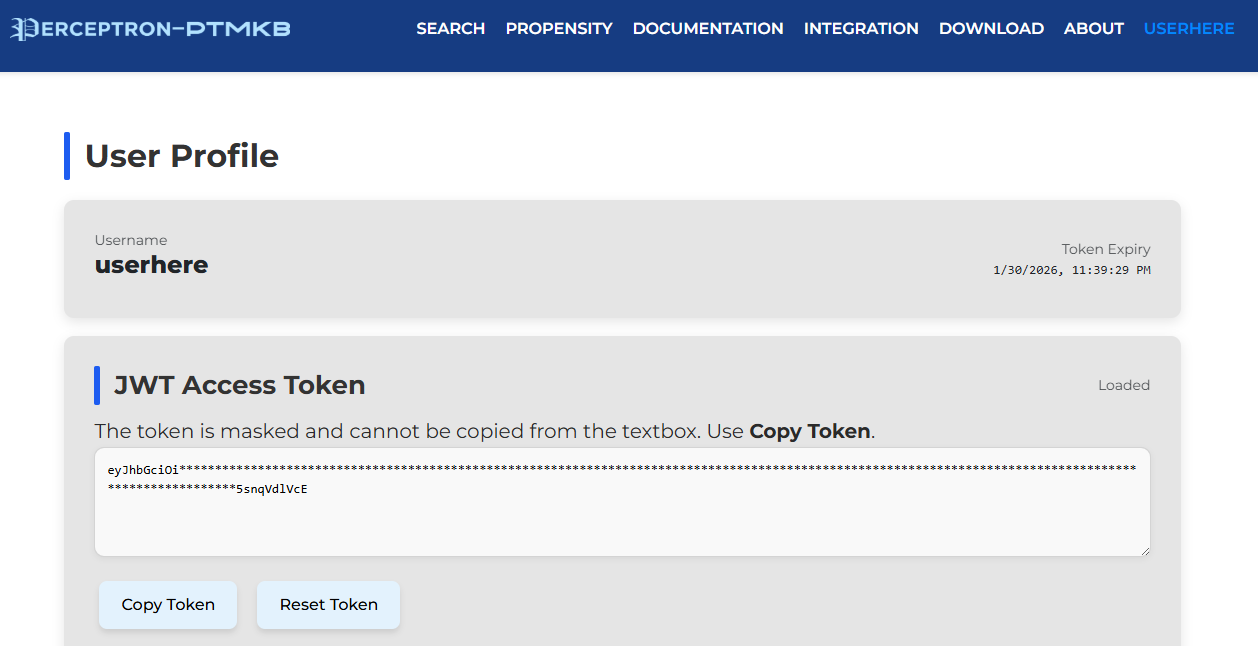
The token is hidden for safety reasons. To acquire the full token, click the "Copy Token" to copy the token to your clipboard. Please note that the provided token is valid only for 5 days from the time of its generation.. When a token expires, you will be prompted to reset a token, which you can do by clicking on the "Reset Token" button.
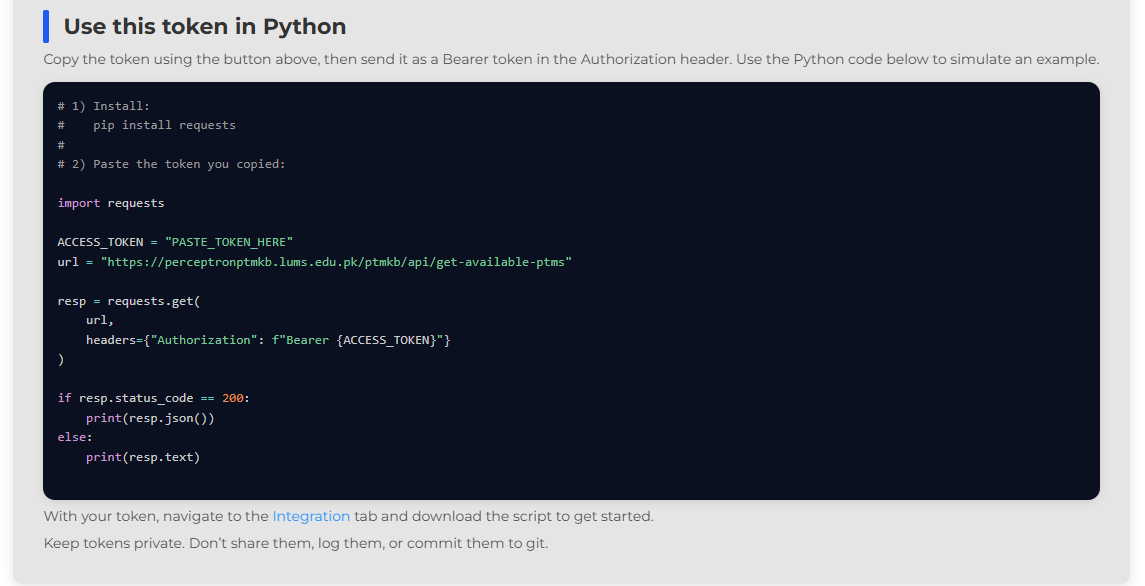
To use the token, a starter guide is presented in the image above. Here, users can copy this code snippet and run the Python code with their copied token. To expand on the implementation further, users can always navigate to the Integration page for more details.
In addition to the token details, the profile also shows a list of search histories performed by your account, shown below.
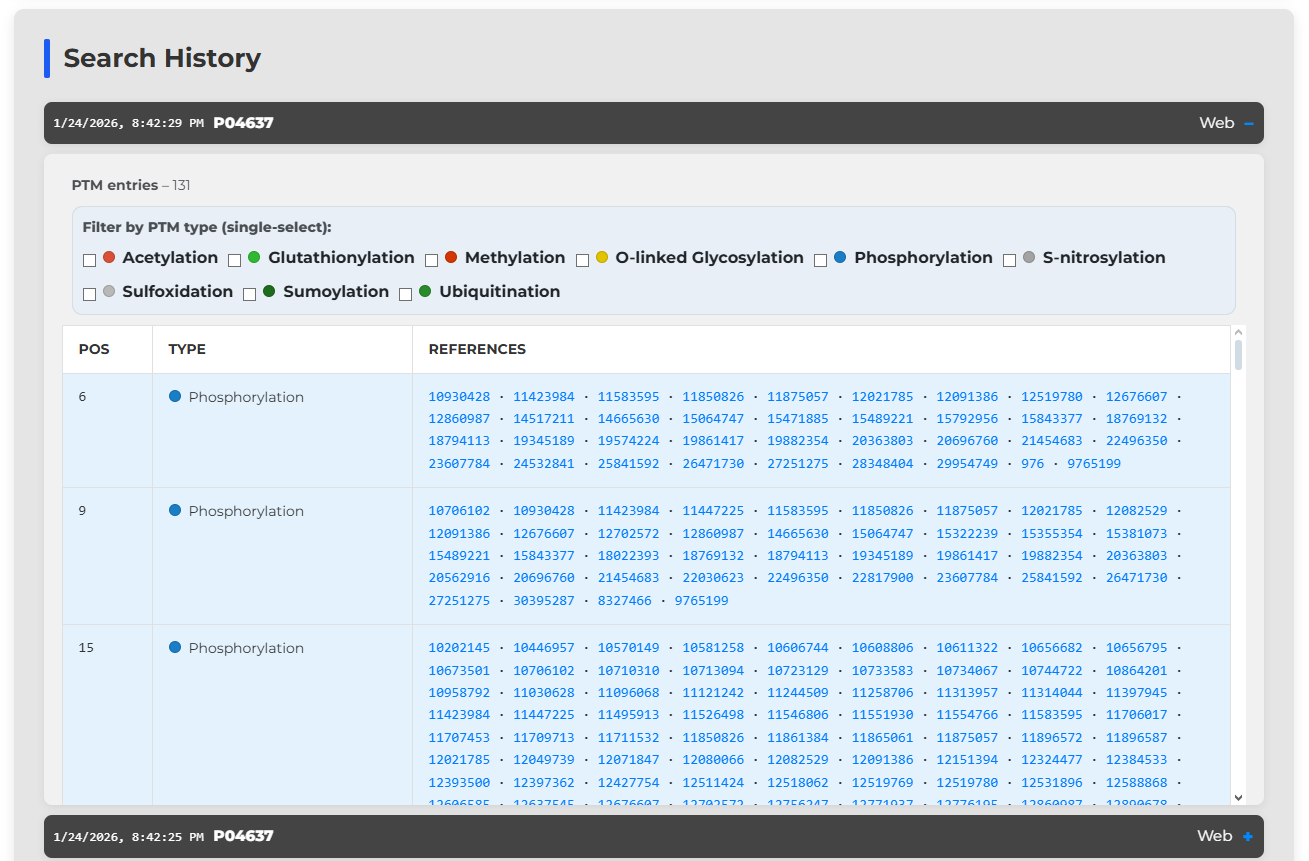
Here, each collapsible entry is marked with the date and time of search, the requested protein identifier or accession number, and what mode was used when searching (in this case, you can see the search was done through the web interface).
Each search entry retrieves a list of clean dbPTM data. This data only references the position of the modification, the type of modification, and the list of evidence identifiers to support the claim. You also have the option to filter the results by modification, allowing quicker navigation.
Download
This page gives you the option to download one of many Post-Translational Modification (PTM) positional matrices. These matrices allow users to find, through a large amount of PTMs on proteins experimentally verified, what the probability of a PTM occurring on an amino acid is. The data is scraped from the experimentally verified database provided by dbPTM and calculated for each PTM on each residue, with relative position of other residues accounted for.
As of the dbPTM 2025 update, 72 PTMs are available which have protein sequences with experimental evidences:
| Acetylation | ADP-ribosylation | AMPylation | Amidation |
| Biotinylation | Blocked amino end | Butyrylation | Carbamidation |
| Carboxyethylation | Carboxylation | Cholesterol ester | Citrullination |
| C-linked Glycosylation | Crotonylation | Deamidation | Deamination |
| Decanoylation | Decarboxylation | Dephosphorylation | D-glucuronoylation |
| Disulfide bond | Farnesylation | Formation of an isopeptide bond | Formylation |
| Gamma-carboxyglutamic acid | Geranylgeranylation | Glutarylation | Glutathionylation |
| GPI-anchor | Hydroxyceramide ester | Hydroxylation | Iodination |
| Lactoylation | Lactylation | Lipoylation | Malonylation |
| Methylation | Myristoylation | N-carbamoylation | Neddylation |
| Nitration | N-linked Glycosylation | N-palmitoylation | Octanoylation |
| O-linked Glycosylation | O-palmitoleoylation | O-palmitoylation | Oxidation |
| Phosphatidylethanolamine amidation | Phosphorylation | Propionylation | Pyrrolidone carboxylic acid |
| Pyrrolylation | Pyruvate | S-archaeol | S-carbamoylation |
| S-Cyanation | S-cysteinylation | S-diacylglycerol | Serotonylation |
| S-linked Glycosylation | S-nitrosylation | S-palmitoylation | Stearoylation |
| Succinylation | Sulfation | Sulfhydration | Sulfoxidation |
| Sumoylation | Thiocarboxylation | Ubiquitination | UMPylation |
Upon selecting a PTM, a residue, and the type of table, you are displayed with the table and the option to download the table as either a CSV, a PDF, a PNG, a SVG, or a JSON.
About
You may view the people working at the Biomedical Informatics & Engineering Research Laboratory (BIRL) and contact us for queries regarding PERCEPTRON-PTMKB.